
If you've ever opened four different browser tabs just to check whether a page has the right meta description, a proper H1, missing image alt text, and a working canonical URL — this post is for you.
Table of Contents
I built SEOVitals because I kept doing exactly that. And every tool I tried either cost money, required signing up, loaded slowly, or only showed me half the picture.
So I built the tool I actually wanted to use. And today I'm making it free for everyone.
What Is SEOVitals?
SEOVitals is a browser extension — available for Chrome, Edge, Brave, Opera, and Firefox — that performs a complete on-page SEO health check on any webpage you're viewing, in under a second.
Open the extension on any page and you instantly get:
- A 0–100 SEO score calculated from 12 weighted signals
- A prioritised fix list ranked by impact — critical issues first
- An 8-tab report covering every on-page SEO dimension
- A PDF export you can send to clients or keep for records
- A Tag Assistant that reveals every tracking pixel installed on the page
No loading spinner waiting on a remote server. No sign-up wall. No paywall. Everything runs locally inside your browser.
SEOVitals is permanently free with no paid tier, no daily limits, and nothing to sign up for.
Why I Built It
I do a lot of SEO audits — for client sites, for my own projects, for quick sanity checks before publishing. The tools I kept reaching for were either:
- Too slow — server-side crawlers that take 30+ seconds to return basic meta data
- Too expensive — full SEO suites where I just need one feature
- Too limited — extensions that only check title and description, nothing else
- Privacy nightmares — tools that send every URL you check to their servers
I wanted something that works instantly on any page, shows me everything in one place, never sends my data anywhere, and is free — permanently, not "free tier with 3 checks a day."
SEOVitals is that tool.
A Full Walkthrough of Every Feature
The SEO Score + Meta Tab
The first thing you see when you open SEOVitals is a score ring — a 0–100 score that gives you an immediate read on the page's SEO health, calculated from 12 signals including title length, meta description, H1 structure, image alt coverage, HTTPS, word count, schema, and social tags.
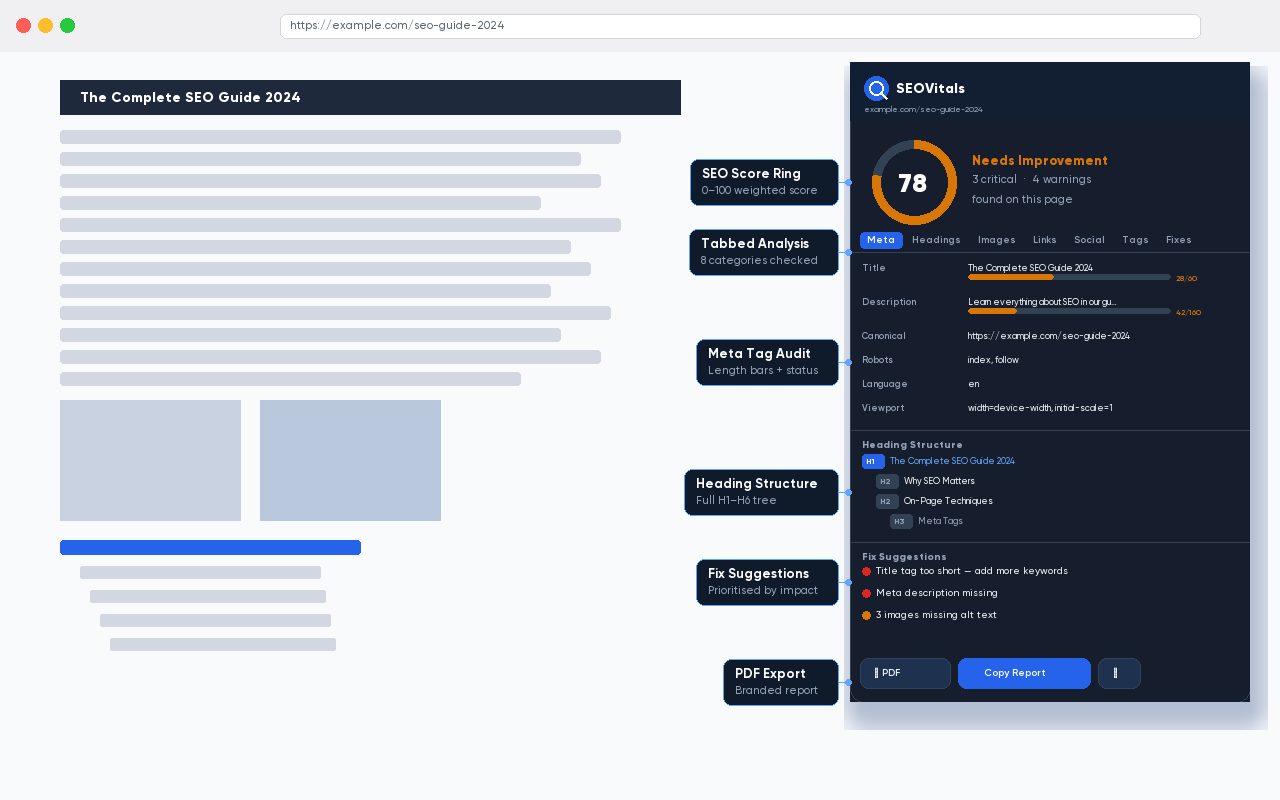
The Meta tab shows the title and description with character-count progress bars colour-coded against the recommended ranges (30–60 chars for title, 70–160 for description). You also see the canonical URL, robots directive, language attribute, viewport tag, and charset — all in one panel.
Heading Structure
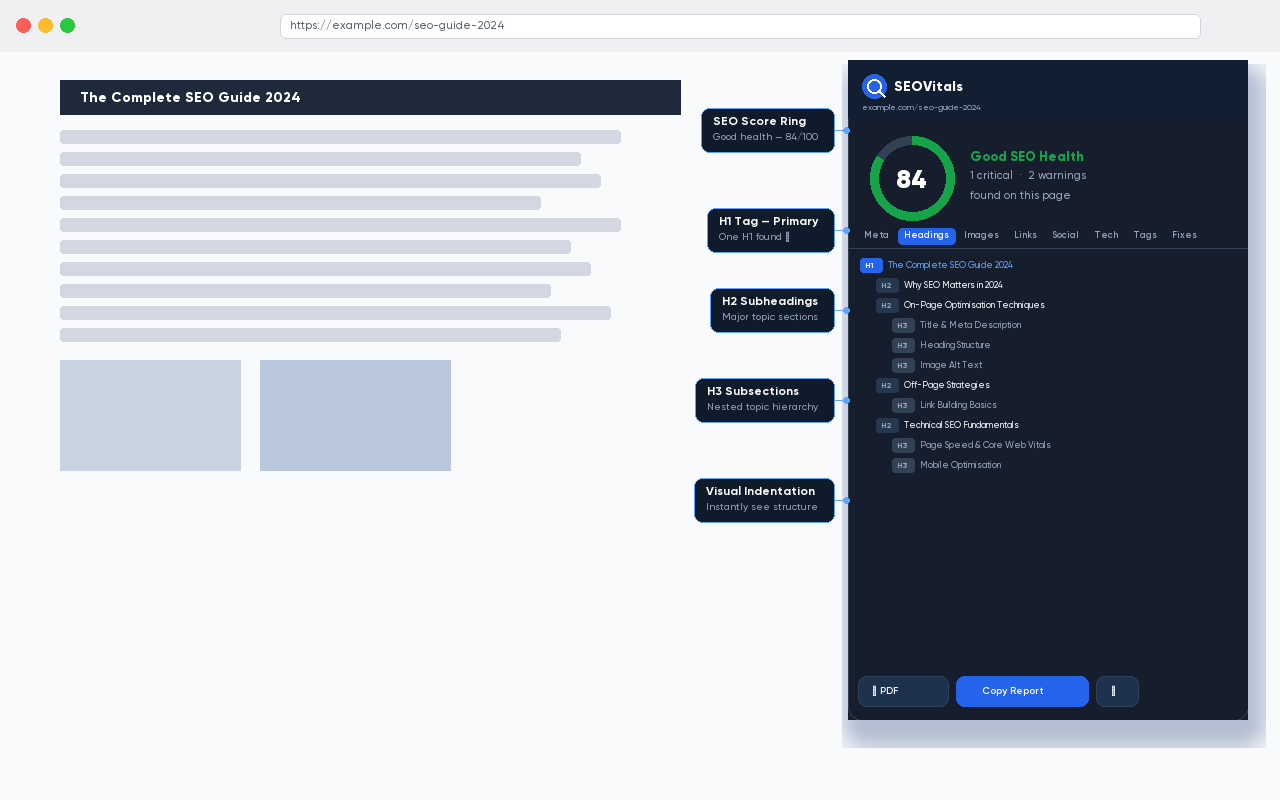
The Headings tab renders the full H1–H6 tree of the page with visual indentation, exactly as the structure appears in the HTML. Missing an H1? Automatic critical warning. More than one H1? Another warning. The tree makes it immediately obvious when headings are skipped, duplicated, or nested incorrectly — something you simply cannot see by reading the page visually.
Images — Alt Text Audit
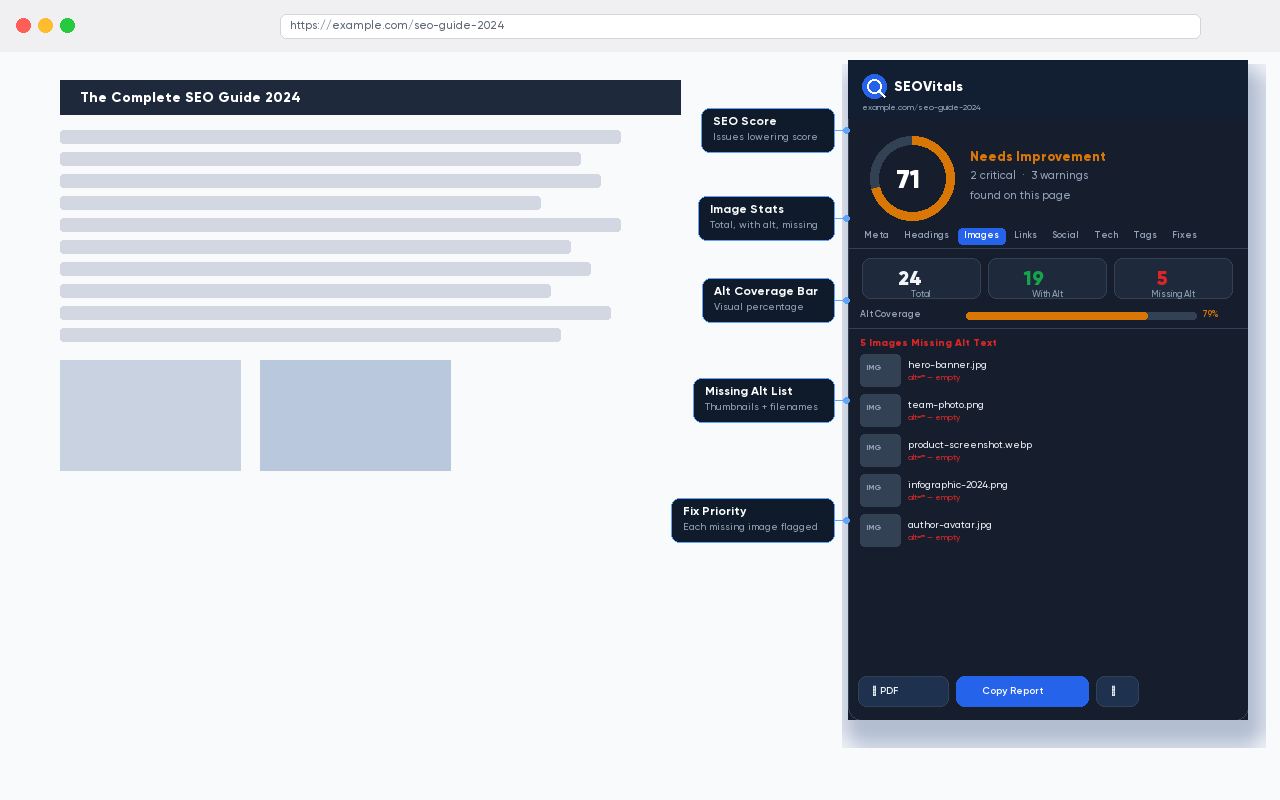
The Images tab gives you total image count, how many have alt text, how many are missing it, an alt coverage percentage with a colour-coded bar, and a list of every image missing alt text with a thumbnail preview. Image alt text is one of the most consistently neglected on-page SEO factors — this tab makes it impossible to miss.
Links
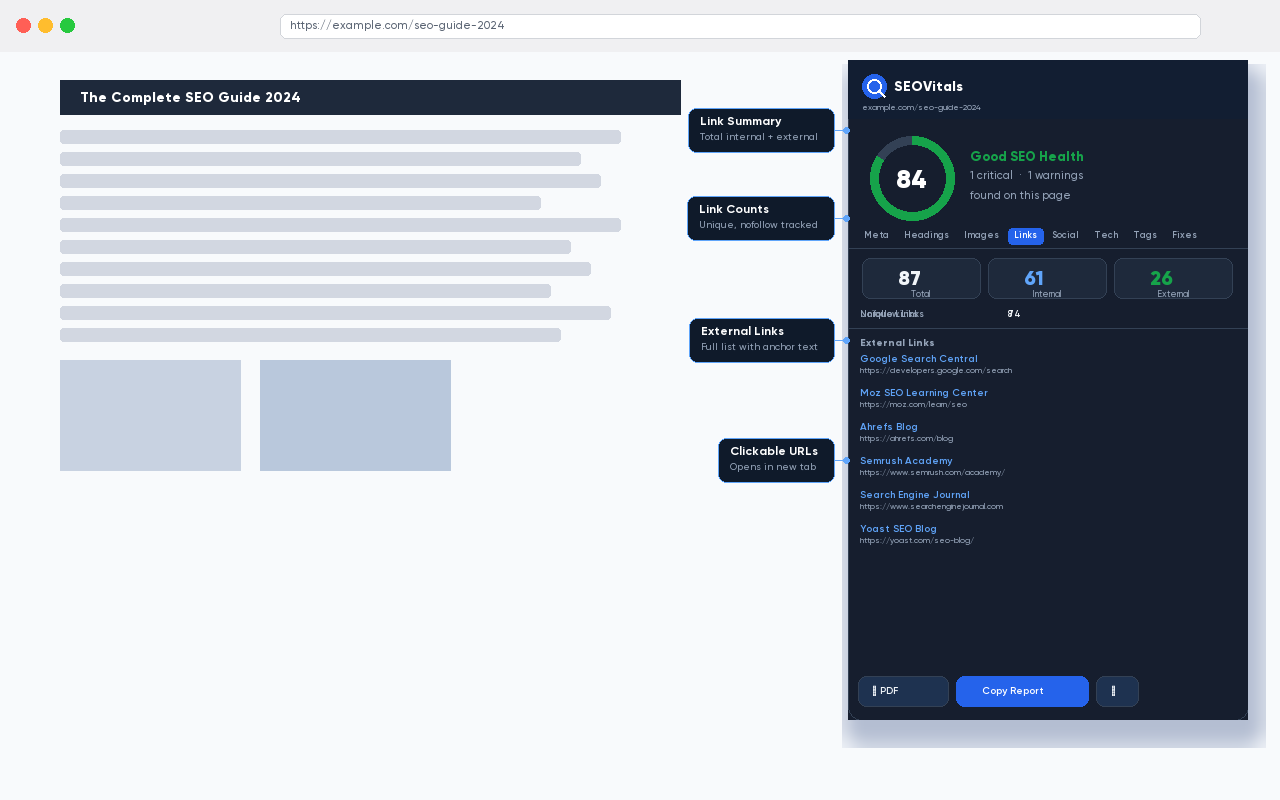
The Links tab shows total, internal, external, unique, and nofollow counts, plus a full list of every external link with anchor text and destination URL. Useful both for outbound link auditing and for quick competitive research on any page.
Social Preview — Open Graph & Twitter Card
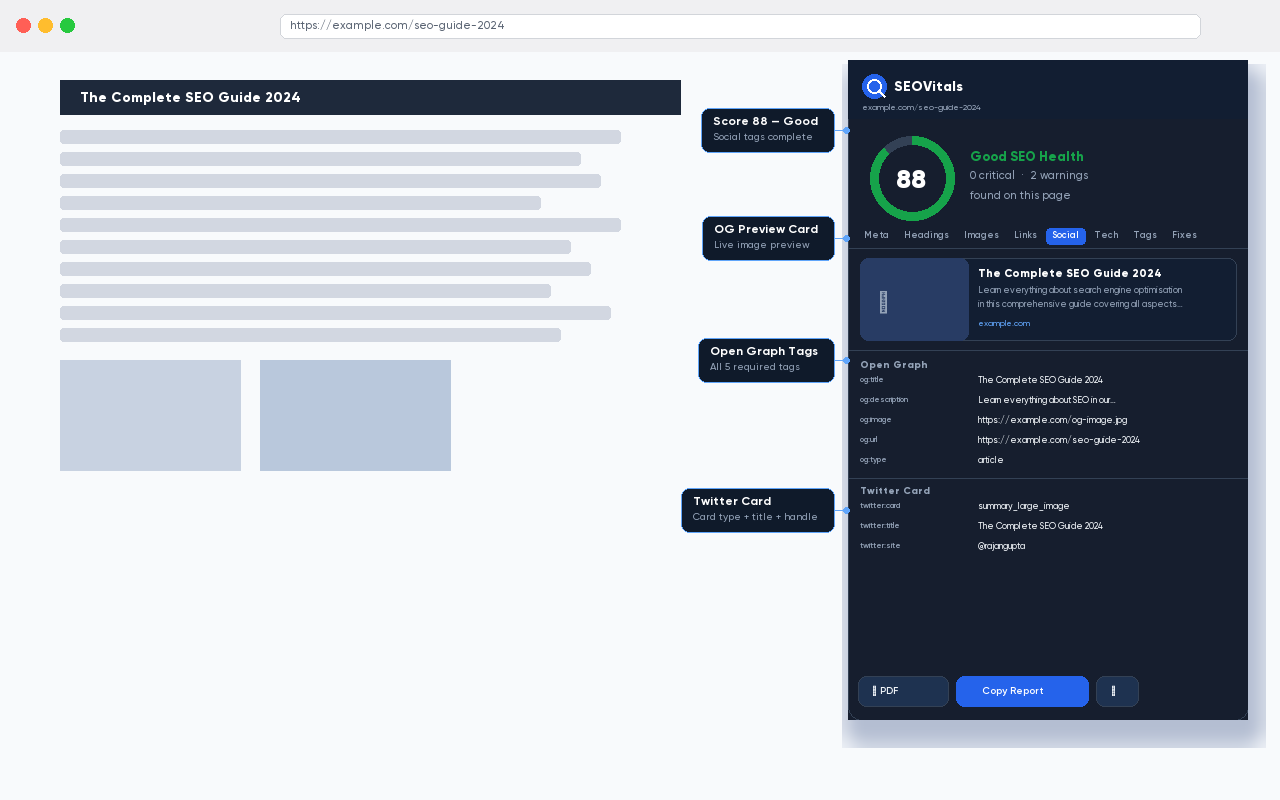
The Social tab renders a live preview of how the page will appear when shared on Facebook, LinkedIn, or any platform that reads Open Graph tags. Below the preview are the raw values for every OG tag and Twitter Card tag. Missing og:image? You see the broken preview immediately — not after posting and wondering why the share looked wrong.
Tag Assistant — See Every Tracking Pixel on the Page
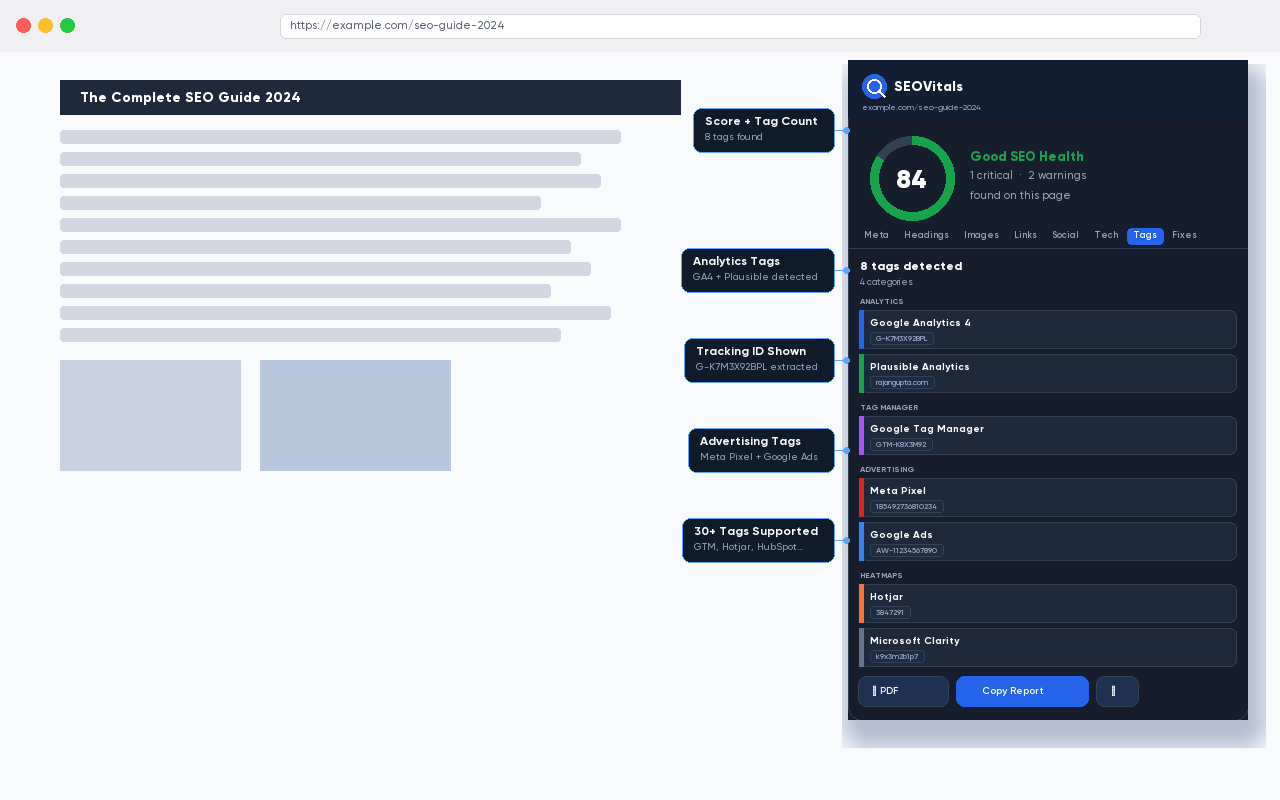
This is the feature that makes SEOVitals genuinely different from other SEO extensions.
Tag Assistant detects 30+ marketing and analytics tags installed on any page — and shows you not just which tag is present, but its actual tracking ID or measurement ID.
| Category | Tags Detected |
|---|---|
| Analytics | Google Analytics 4, Universal Analytics, Plausible, Fathom, Matomo, Cloudflare Insights |
| Tag Managers | Google Tag Manager |
| Advertising | Meta Pixel, Google Ads, LinkedIn Insight, TikTok Pixel, Twitter Pixel |
| Heatmaps | Hotjar, Microsoft Clarity |
| CRM & Chat | HubSpot, Intercom, Drift, Zendesk, Crisp |
| Ecommerce | Stripe, Paddle, Klaviyo |
| Infrastructure | Sentry, Datadog, OneSignal, Braze |
Why does showing the tracking ID matter? Because if you're auditing a site and need to confirm whether a GA4 property is the right one, or whether a GTM container matches what's in the docs, a chip that says "Google Analytics 4" isn't enough. Seeing G-K7M3X92BPL is. This feature alone has saved me from multiple "why is data not showing up in GA4?" debugging sessions.
Fix Suggestions — Ranked by Impact
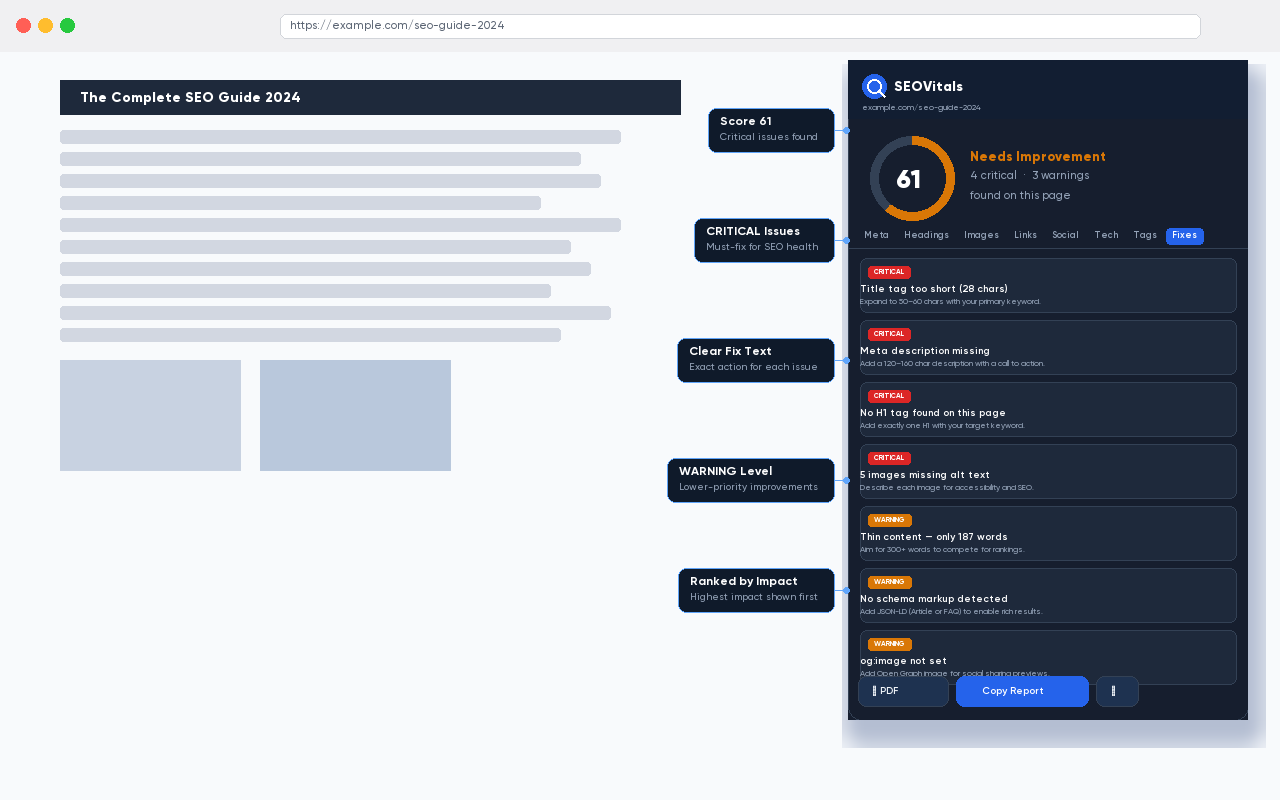
The Fixes tab pulls together every issue detected across all tabs and ranks them by severity — Critical (direct ranking impact), Warning (worth addressing soon), and Suggestion (improvements). Every issue includes a plain-English fix instruction. This is the tab I send clients to first. One screenshot communicates the SEO situation faster than any written report.
PDF Report Export
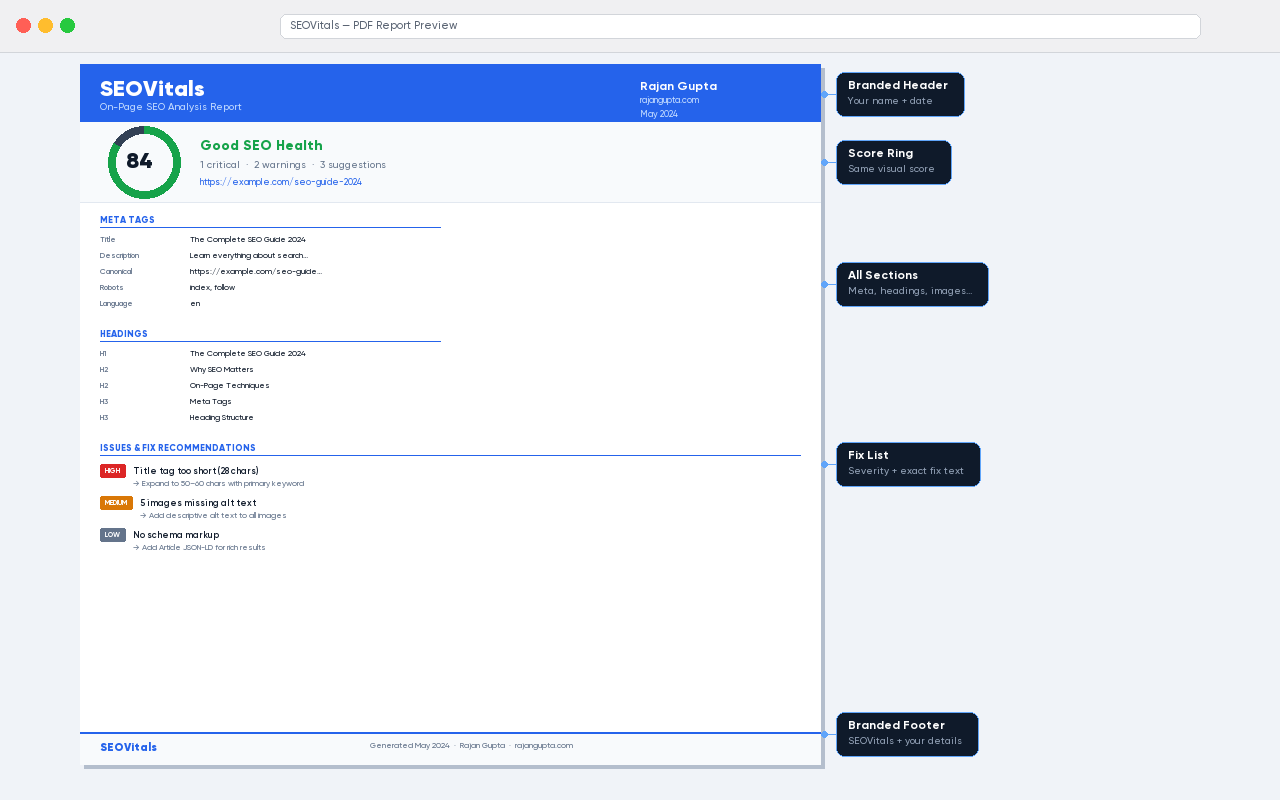
Click the PDF button and SEOVitals generates a fully branded, printable PDF report — score ring, all sections, issue list with fix recommendations, and the date. No third-party service. No upload. The PDF is generated entirely in-browser, keeping everything private and fast.
This makes SEOVitals genuinely useful for client work. Instead of screenshotting five different tools and pasting into a deck, you get one professional document in one click.
How SEOVitals Compares
| Feature | SEOVitals | Clio SEO Lite | SEO Meta in 1 Click |
|---|---|---|---|
| SEO Score 0–100 | ✓ | ✕ | ✕ |
| Prioritised fix list | ✓ | ✕ | ✕ |
| Tag Assistant (30+ tags) | ✓ | ✕ | ✕ |
| Tracking ID extraction | ✓ | ✕ | ✕ |
| PDF report export | ✓ | ✕ | ✕ |
| Live OG preview | ✓ | Limited | ✓ |
| Schema detection | ✓ | ✕ | ✓ |
| Zero data collection | ✓ | Unknown | Unknown |
| Free, no account | ✓ | ✓ | ✓ |
Privacy — The Part Most Extensions Skip
SEOVitals collects nothing.
Every other SEO tool I evaluated sends your URLs to their servers — either for analysis, for caching, or quietly for "product improvement." Some require accounts, which means they can tie your browsing history to your identity.
SEOVitals works differently by design:
- No network requests — the extension never connects to any server
- No analytics — we don't track how you use the extension
- No account — nothing to sign up for, nothing to log in to
- activeTab only — reads only the page you explicitly open the popup on
Our Privacy Policy is two paragraphsBecause there is genuinely nothing to disclose. All analysis runs locally. No data ever leaves your browser. Read it here.
How to Install
SEOVitals is available directly from the Chrome Web Store — search for "SEOVitals" or use the button below.
For Firefox, Edge, Brave, and Opera — download directly from seovitals.rajangupta.com and follow the one-page install guide.
Who is this for?
- SEO professionals — get the full picture in seconds, export to PDF for clients
- Content writers — check every post before publishing without leaving the browser
- Developers — verify meta tags, schema, and canonical setup during QA
- Digital marketers — see exactly which tracking tags a competitor has installed
- Site owners — understand what's hurting your rankings without needing an agency
Try SEOVitals — It's Free
Open it on your site right now and get your first SEO health check in under a second. No account, no limits, no catch.
What's Coming Next
SEOVitals 1.0 is the foundation. Features I'm considering for future versions:
- Keyword density analysis — see how often your target keyword appears and where
- Core Web Vitals — performance data alongside SEO data
- Bulk export — analyse multiple pages and combine into one report
- Compare mode — run two pages side by side
If there's a feature you'd find genuinely useful, reach out — I'm building this based on what real users actually need.
Get the free WordPress Security Checklist 2026
25-point checklist PDF - malware detection, hardening guide, login security. Used by 500+ WordPress site owners.
- ✓ 25-point security checklist PDF
- ✓ WordPress malware scan guide
- ✓ Hardening checklist for any WordPress site
No spam. Unsubscribe any time.
You're in!
Check your inbox - the checklist PDF is on its way.
Need help with your WordPress site?
I'm a freelance WordPress developer who fixes exactly this kind of problem.
150+ projects. Clients in UK, US, UAE & Ireland. Fast turnaround.

Rajan Gupta
Freelance WordPress DeveloperI'm Rajan Gupta, a freelance WordPress developer based in India with 150+ projects delivered for agencies and businesses in the UK, US, UAE, and Ireland. I specialise in performance optimisation, Core Web Vitals, custom Sage/ACF builds, and WooCommerce development - every project ships with a 90+ PageSpeed baseline.