
WooCommerce Abandoned Cart Recovery (Email + Auto Restore Cart)
Abandoned carts are one of the biggest silent revenue killers for WooCommerce stores. Customers add products, reach checkout, enter their email… and then disappear.
The good news? You can recover 15–30% of those lost orders using a smart abandoned cart recovery flow — without using any plugin.
In this guide, you’ll learn exactly how WooCommerce abandoned cart recovery works, why most setups fail, and how to build a production-ready solution with:
- Automated abandoned cart emails
- Restore cart links (no empty cart issue)
- Auto-apply coupon logic
- Guest + logged-in user support
- Cron-based email scheduling
What Is an Abandoned Cart in WooCommerce?
A cart is considered abandoned when a user:
- Adds products to the cart
- Reaches checkout or cart page
- Leaves the website without completing payment
In WooCommerce, this happens very frequently, especially on mobile devices.
Common reasons include:
- Unexpected shipping cost
- Distraction or interruption
- No coupon or discount
- Slow checkout experience
- Just “thinking about it”
Why WooCommerce Abandoned Cart Recovery Is Important
Here’s why abandoned cart recovery is critical:
- Average cart abandonment rate: 70%+
- Recovery emails can convert 5–30% of lost carts
- Email has the highest ROI among marketing channels
Even recovering 10% of abandoned carts can significantly boost monthly revenue.
How WooCommerce Abandoned Cart Recovery Works
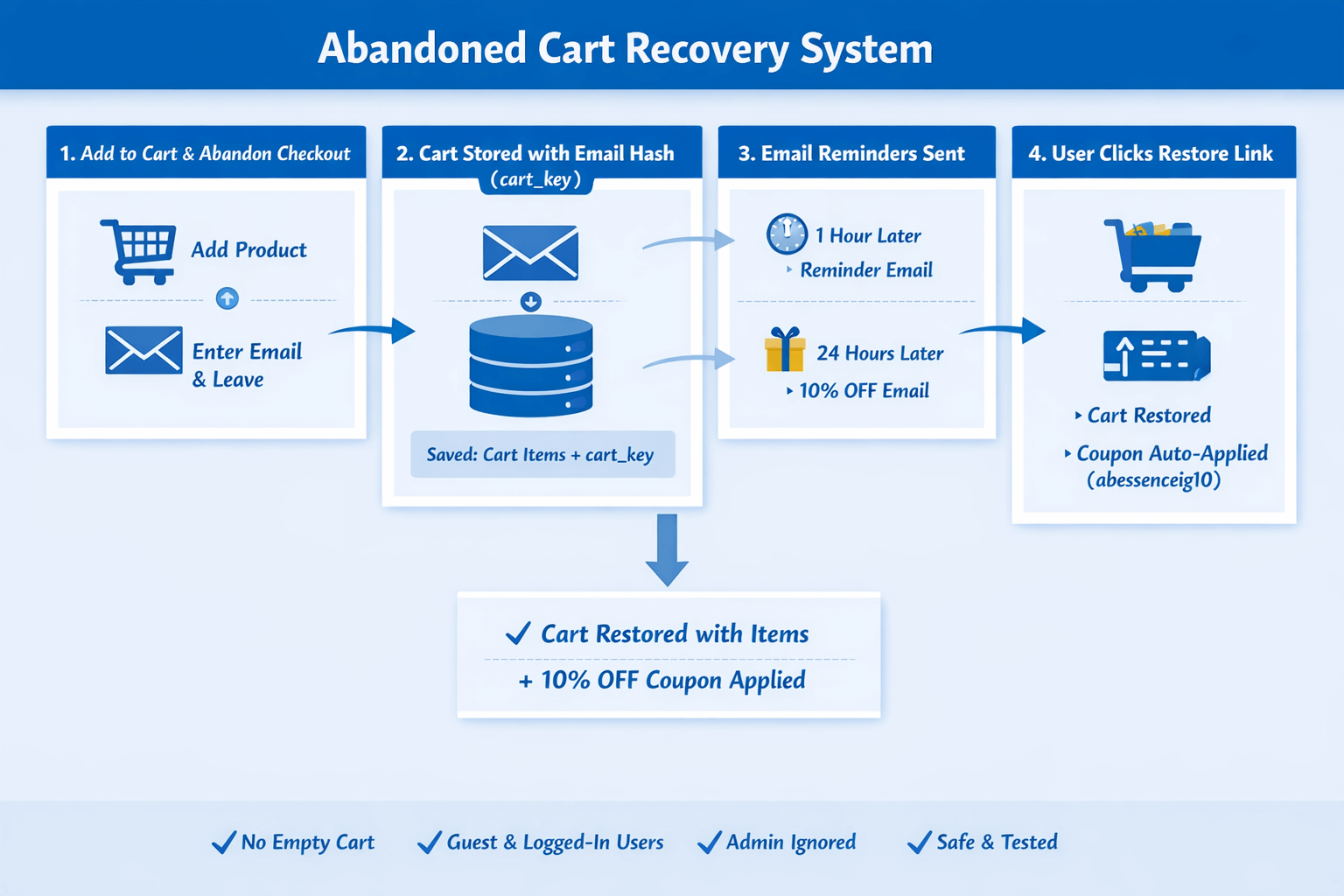
At a high level, the flow looks like this:
- User adds product to cart
- Email is captured (guest or logged-in)
- Cart data is stored in database
- User leaves the site
- Automated email is sent after delay
- Email contains a restore-cart link
- Cart is rebuilt when user clicks
- Coupon is auto-applied (optional)
This approach works even for guest users, which is where most abandoned carts come from.
WooCommerce Abandoned Cart Recovery Without Plugin
Most abandoned cart plugins:
- Are heavy
- Slow down checkout
- Conflict with themes
- Break sessions
- Lock features behind paid plans
A custom code-based solution gives you:
- Full control
- Better performance
- No recurring costs
- Clean data handling
And yes — WooCommerce provides enough hooks to do this properly.
Capturing Email for Guest Users
WooCommerce does not automatically save guest emails until order creation.
To recover guest carts, we capture the email when the user:
- Enters it on checkout
This allows abandoned cart tracking before payment.
Logged-in users are handled automatically using their account email.
Storing Cart Data Safely
A common mistake is relying on WooCommerce sessions.
Sessions expire, regenerate, and break — causing the infamous:
❌ “Empty cart after clicking email link”
Instead, the correct approach is:
- Generate a persistent cart key (email hash)
- Store cart data in WordPress options or custom table
- Restore cart using that key
This guarantees cart restoration every time.
Sending Abandoned Cart Emails Automatically
Emails are sent using WordPress cron:
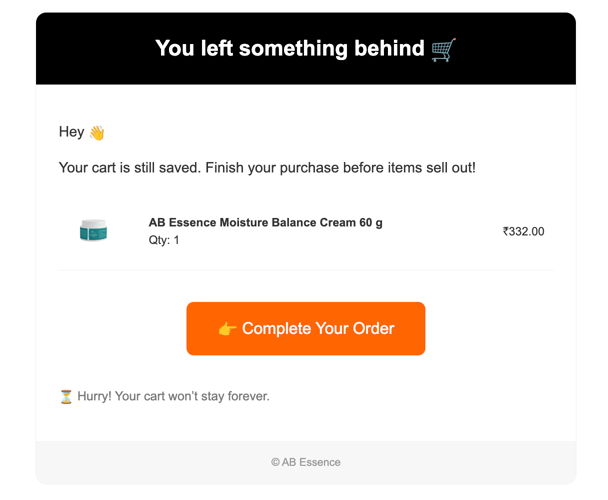
- First reminder → after 1 hour
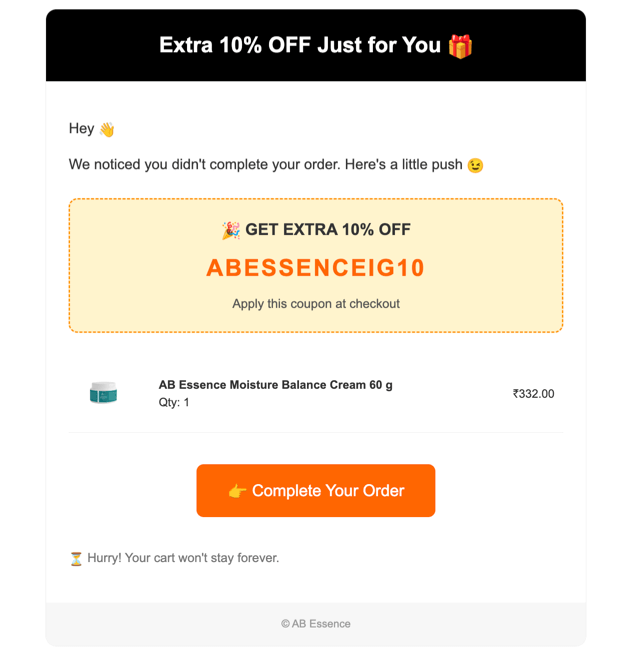
- Second reminder → after 24 hours
For testing, delays can be reduced to minutes.
Each email includes:
- Friendly reminder copy
- Cart summary
- Clear CTA button
- Optional discount incentive
add_action('wp_ajax_save_guest_email', 'save_guest_email');
add_action('wp_ajax_nopriv_save_guest_email', 'save_guest_email');
function save_guest_email() {
if (!empty($_POST['email'])) {
WC()->session->set('guest_email', sanitize_email($_POST['email']));
}
wp_die();
}
add_action('woocommerce_after_checkout_validation', function ($data) {
if (!empty($data['billing_email'])) {
WC()->session->set('guest_email', sanitize_email($data['billing_email']));
}
}, 10, 1);
add_action('woocommerce_cart_updated', 'store_abandoned_cart');
function store_abandoned_cart() {
if (WC()->cart->is_empty()) return;
$session_id = WC()->session->get_customer_id();
if (!$session_id) return;
$user_id = get_current_user_id();
$email = '';
if ($user_id) {
$user = get_user_by('id', $user_id);
$email = $user->user_email;
} else {
$email = WC()->session->get('guest_email');
}
if (!$email) return;
$existing = get_option('abandoned_cart_' . $session_id);
$cart_data = [
'session_id' => $session_id,
'email' => $email,
'cart' => WC()->cart->get_cart(),
'time' => $existing['time'] ?? time(),
'first_sent' => $existing['first_sent'] ?? false,
'second_sent' => $existing['second_sent'] ?? false,
];
update_option('abandoned_cart_' . $session_id, $cart_data);
}
add_action('wp', function () {
if (!wp_next_scheduled('send_abandoned_cart_reminders')) {
wp_schedule_event(time(), 'hourly', 'send_abandoned_cart_reminders');
}
});
add_action('send_abandoned_cart_reminders', 'send_cart_reminder_emails');
function send_cart_reminder_emails() {
$options = wp_load_alloptions();
foreach ($options as $key => $value) {
if (strpos($key, 'abandoned_cart_') === false) continue;
$session_id = str_replace('abandoned_cart_', '', $key);
$data = maybe_unserialize($value);
if (!$data || empty($data['cart'])) continue;
$now = time();
if (!$data['first_sent'] && ($now - $data['time']) >= 3600) {
set_transient('ac_session_' . md5($data['email'] . $data['time']), $session_id, 3600);
wp_mail(
$data['email'],
'🛒 Still thinking? Your cart is waiting',
abandoned_cart_email_template($data, false),
['Content-Type: text/html; charset=UTF-8']
);
$data['first_sent'] = true;
update_option($key, $data);
continue;
}
if ($data['first_sent'] && !$data['second_sent'] && ($now - $data['time']) >= 86400) {
set_transient('ac_session_' . md5($data['email'] . $data['time']), $session_id, 3600);
wp_mail(
$data['email'],
'🎁 Extra 10% OFF – Complete your order',
abandoned_cart_email_template($data, true),
['Content-Type: text/html; charset=UTF-8']
);
$data['second_sent'] = true;
update_option($key, $data);
}
// Cleanup after 2 emails
if ($data['first_sent'] && $data['second_sent']) {
delete_option($key);
// Cleanup transient too
delete_transient('ac_session_' . md5($data['email'] . $data['time']));
}
}
}
function abandoned_cart_email_template($data, $with_coupon = false) {
$coupon = 'abessenceig10';
$session_id = get_transient('ac_session_' . md5($data['email'] . $data['time'])) ?: $data['session_id'];
ob_start(); ?>
Email Html
$session_id];
if ($coupon) $args['apply_coupon'] = $coupon;
return add_query_arg($args, wc_get_cart_url());
}
add_action('woocommerce_before_cart', function () {
if (!isset($_GET['apply_coupon'])) return;
$coupon = sanitize_text_field($_GET['apply_coupon']);
if (!WC()->cart->has_discount($coupon)) {
WC()->cart->add_discount($coupon);
}
});
add_action('init', 'restore_abandoned_cart');
function restore_abandoned_cart() {
if (!isset($_GET['restore_cart'])) return;
$session_id = sanitize_text_field($_GET['restore_cart']);
$data = get_option('abandoned_cart_' . $session_id);
if (!$data || empty($data['cart'])) return;
WC()->cart->empty_cart();
foreach ($data['cart'] as $item) {
WC()->cart->add_to_cart(
$item['product_id'],
$item['quantity'],
$item['variation_id'] ?? 0,
$item['variation'] ?? []
);
}
}
add_action('init', function () {
if (isset($_GET['track_open'])) {
$session_id = sanitize_text_field($_GET['track_open']);
update_option('abandoned_open_' . $session_id, time());
header('Content-Type: image/gif');
echo base64_decode('R0lGODlhAQABAIAAAAAAAP///ywAAAAAAQABAAACAUwAOw==');
exit;
}
});
add_action('init', function () {
if (isset($_GET['track_click'])) {
$session_id = sanitize_text_field($_GET['track_click']);
update_option('abandoned_click_' . $session_id, time());
wp_redirect(wc_get_cart_url());
exit;
}
});
add_action('admin_menu', function () {
add_menu_page(
'Abandoned Carts',
'Abandoned Carts',
'manage_woocommerce',
'abandoned-carts',
'render_abandoned_cart_dashboard',
'dashicons-cart',
56
);
});
function render_abandoned_cart_dashboard() {
echo 'Abandoned Carts
';
echo '
Session ID Email Items Created 1st Sent 2nd Sent Opened Clicked
' . esc_html($session_id) . '
' . esc_html($data['email']) . '
' . count($data['cart']) . '
' . date('d M Y H:i', $data['time']) . '
' . ($data['first_sent'] ? '✅' : '❌') . '
' . ($data['second_sent'] ? '✅' : '❌') . '
' . (get_option('abandoned_open_' . $session_id) ? '✅' : '❌') . '
' . (get_option('abandoned_click_' . $session_id) ? '✅' : '❌') . '
';
}
echo '
';
echo 'Test: Uncomment 30s/90s timings in send_cart_reminder_emails(), add items as guest, wait & check emails.
';
}
#https://abessence.in/?run_abandoned_cart=1
Using Coupons to Increase Conversion
Adding a small incentive can dramatically increase recovery rate.
Best practices:
- Use time-based urgency
- Highlight coupon visually
- Auto-apply coupon via URL
Example:
🎁 Extra 10% OFF – Complete Your Order Now
Auto-applied coupons remove friction and improve checkout completion.
Restore Cart Link – How It Works
The restore link contains a unique key:
/cart/?ab_restore=unique_cart_key
When clicked:
- Cart is emptied
- Stored items are re-added
- Coupon is applied (if present)
This works for:
- Guest users
- Logged-in users
- Cross-device sessions
Testing Abandoned Cart Emails Immediately
To test without waiting hours:
- Reduce cron delays to 1–2 minutes
- Manually trigger cron via URL
This allows full end-to-end testing:
- Cart capture
- Email delivery
- Restore flow
- Coupon application
Common Issues and Fixes
Empty Cart After Clicking Email
Cause: WooCommerce session dependency
Fix: Use persistent cart key (email hash)
Emails Not Sending
Cause: WP-Cron not running
Fix:
- Ensure site traffic exists
- Or trigger cron manually
Admin Cart Being Tracked
Cause: Missing role check
Fix: Exclude manage_woocommerce capability
SEO & Performance Benefits
This custom approach:
- Adds zero frontend bloat
- Avoids heavy JavaScript
- Keeps checkout fast
- Improves Core Web Vitals
Perfect for stores focused on performance and conversions.
Final Thoughts
WooCommerce abandoned cart recovery is not optional — it’s essential.
By implementing:
- Smart email capture
- Reliable cart storage
- Automated reminders
- Restore-cart links
- Coupon incentives
You can turn lost visitors into paying customers — consistently.
Best of all, you don’t need expensive plugins or monthly fees.
Frequently Asked Questions
Can WooCommerce recover abandoned carts automatically?
Yes, using cron-based emails and restore cart links.
Can I send abandoned cart emails without a plugin?
Absolutely. WooCommerce hooks are enough.
Does this work for guest users?
Yes, as long as email is captured.
Can coupons be auto-applied?
Yes, via URL-based coupon logic.
Need Help Implementing This on Your WooCommerce Store?
Recover lost WooCommerce sales automatically with abandoned cart emails, restore-cart links, and coupon automation — fully set up and tested on your store. Need this implemented on your store? Contact Us for Setup
For Store Owners & Admins
If you’re a WooCommerce store admin, you don’t need to worry about daily monitoring or manual follow-ups. Once this abandoned cart recovery system is set up, it runs automatically in the background — capturing carts, sending reminder emails, restoring items, and applying coupons without any ongoing effort from your side. You’ll simply start seeing recovered orders come through your store.

As an admin, you can review abandoned cart behavior, validate email delivery, and test the full recovery flow without affecting live customers. The system is designed to be safe for production stores, excludes admin carts automatically, and works reliably for both guest and logged-in users — giving you full confidence before and after going live.

Rajan Gupta
FullStack Web DeveloperRajan Gupta is a passionate web developer and digital creator who loves sharing insights on WordPress, modern web design, and performance optimization. When not coding, they enjoy exploring the latest tech trends and helping others build stunning, high-performing websites.